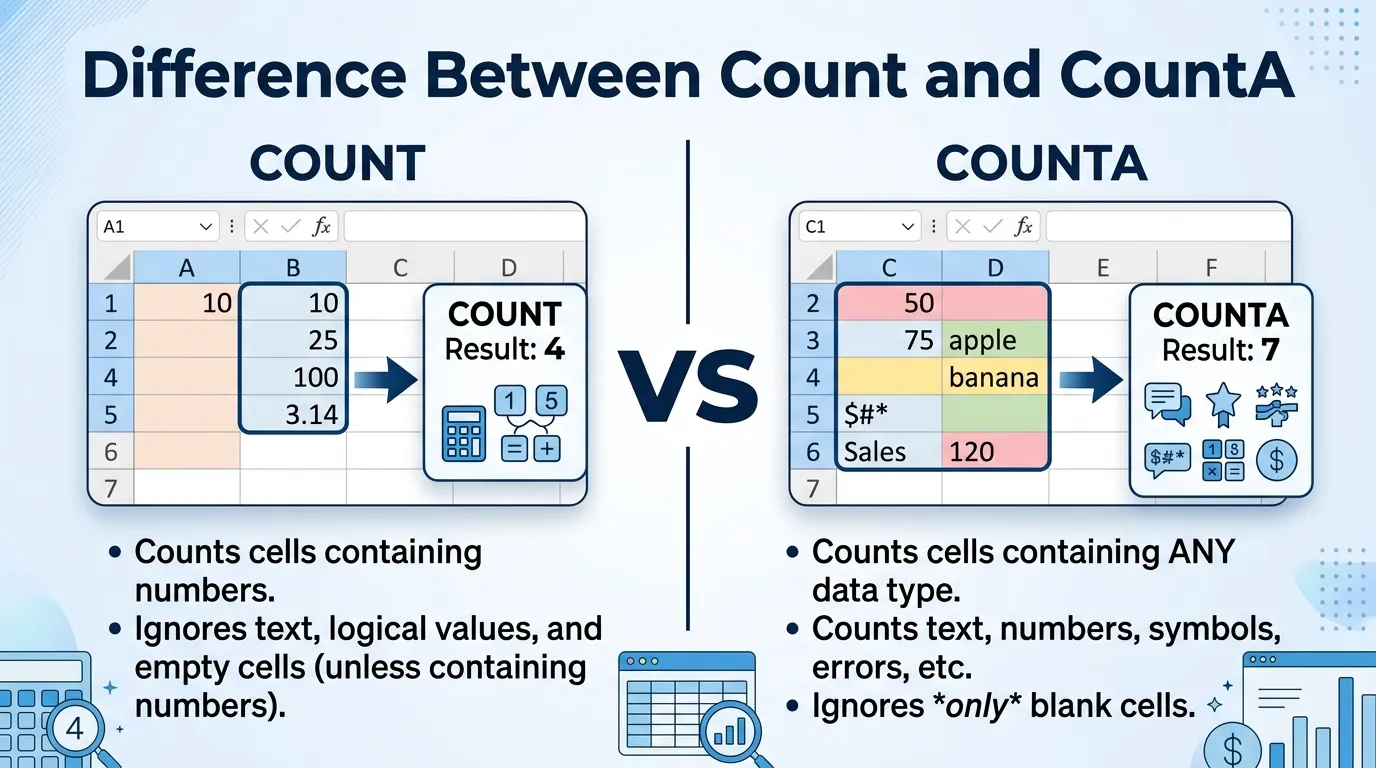
The difference between COUNT and COUNTA is that COUNT only counts cells containing numbers, while COUNTA counts all non-empty cells including text, numbers, logical values, and errors.
Understanding the difference between COUNT and COUNTA is essential for anyone working with spreadsheets, data analysis, or office software. Whether you use Microsoft Excel or Google Sheets, these two functions are among the most commonly used tools for counting data. At first glance, they may seem almost identical because both are used to count cells. However, the difference between COUNT and COUNTA becomes very important when working with different types of spreadsheet data.
The COUNT function is designed specifically to count numeric values. This includes numbers, dates, and numerical formulas. In contrast, COUNTA counts almost every type of non-empty cell, including text, numbers, symbols, logical values, and even error messages.
Learning the difference between COUNT and COUNTA helps users avoid calculation mistakes, improve spreadsheet accuracy, and work more efficiently with datasets. By understanding the difference between COUNT and COUNTA, beginners and professionals alike can manage data more effectively and choose the correct formula for different situations.
Pronunciation
COUNT
US: /kaʊnt/
COUNTA
US: /ˈkaʊn.tə/
Key Difference Between the Both
The main difference between COUNT and COUNTA is that COUNT counts only numeric cells, while COUNTA counts every non-empty cell regardless of content type.
Why Is Their Difference Important?
Knowing the difference between COUNT and COUNTA is important because choosing the wrong function can produce incorrect spreadsheet results.
For example:
- If you only want to count numbers, COUNT is appropriate.
- If you want to count all filled cells, COUNTA is better.
Understanding the difference between COUNT and COUNTA improves:
- Data accuracy
- Spreadsheet efficiency
- Reporting quality
- Formula selection
Without understanding the difference between COUNT and COUNTA, users may misinterpret data totals.
Difference Between COUNT and COUNTA
1. Main Function
COUNT counts numeric values only.
COUNTA counts all non-empty cells.
Examples
COUNT:
- Numbers
- Dates
- Numeric formulas
COUNTA:
- Text
- Numbers
- Symbols
- Logical values
2. Treatment of Text
COUNT ignores text cells.
COUNTA includes text cells.
Examples
Cell contents:
- “Apple”
COUNT:
- Not counted
COUNTA:
- Counted
3. Empty Cells
Both functions ignore completely empty cells.
4. Numbers
COUNT includes numbers.
COUNTA also includes numbers.
Examples
- 25
- 100
- 3.14
Both functions count these values.
5. Logical Values
COUNT usually ignores logical text unless entered directly as arguments.
COUNTA counts logical values if the cell is not empty.
Examples
- TRUE
- FALSE
COUNTA counts them.
6. Error Values
COUNT ignores most error values.
COUNTA counts cells containing errors because they are not empty.
7. Primary Use
COUNT is mainly used for numerical analysis.
COUNTA is used for general data counting.
8. Formula Behaviour
COUNT focuses on quantity of numbers.
COUNTA focuses on quantity of filled cells.
9. Data Analysis
COUNT is useful for financial or statistical data.
COUNTA is useful for attendance lists, names, and mixed datasets.
10. Flexibility
COUNTA is generally more flexible because it handles multiple data types.
Nature and Purpose of Both Functions
The difference between COUNT and COUNTA lies mainly in data recognition.
COUNT is specialized for numeric datasets where only numbers matter.
COUNTA is broader and counts any cell that contains data.
Both functions are valuable but serve different spreadsheet purposes.
Why People Are Confused?
People often become confused about the difference between COUNT and COUNTA because:
- Both functions are used for counting
- Their names are very similar
- Both ignore empty cells
Many beginners assume COUNT counts every filled cell, but it only counts numbers. This misunderstanding leads to inaccurate calculations.
Understanding the difference between COUNT and COUNTA helps avoid this common mistake.
Comparison Table
| Feature | COUNT | COUNTA | Similarity |
| Counts Numbers | Yes | Yes | Counting functions |
| Counts Text | No | Yes | Spreadsheet formulas |
| Counts Empty Cells | No | No | Used in Excel/Sheets |
| Counts Errors | Usually no | Yes | Data analysis tools |
| Main Use | Numeric data | Non-empty cells | Cell counting |
Syntax of Both Functions
COUNT Syntax
=COUNT(value1, [value2], …)
Example
=COUNT(A1:A10)
This counts only numeric cells in the range.
COUNTA Syntax
=COUNTA(value1, [value2], …)
Example
=COUNTA(A1:A10)
This counts all non-empty cells in the range.
Practical Example
Suppose a spreadsheet contains:
| Cell | Value |
| A1 | 10 |
| A2 | Apple |
| A3 | 25 |
| A4 | Empty |
| A5 | TRUE |
COUNT Result
=COUNT(A1:A5)
Result:
- 2
Because only numeric values are counted.
COUNTA Result
=COUNTA(A1:A5)
Result:
- 4
Because all non-empty cells are counted.
Advantages and Disadvantages
Advantages of COUNT
- Accurate for numeric analysis
- Useful in statistics and finance
- Avoids counting irrelevant text
Disadvantages
- Ignores text values
- Less useful for mixed datasets
Advantages of COUNTA
- Flexible counting
- Works with mixed data types
- Useful for attendance and records
Disadvantages
- Counts unwanted text or errors sometimes
- May overcount in messy datasets
Which Is Better in What Situation?
COUNT
COUNT is better for:
- Financial reports
- Mathematical datasets
- Statistical calculations
Best For
- Sales totals
- Grades
- Numerical records
COUNTA
COUNTA is better for:
- Attendance tracking
- Name lists
- Mixed information tables
Best For
- Contact databases
- Surveys
- Inventory records
Common Mistakes
Mistake 1: Using COUNT for Text Data
Example:
- Expecting COUNT to count names
Reality:
- COUNT ignores text cells.
Mistake 2: Using COUNTA with Hidden Errors
COUNTA may count cells containing:
- Error values
- Unwanted spaces
- Invisible data
Educational Importance
The difference between COUNT and COUNTA is important in spreadsheet education because these are foundational functions used in:
- Data analysis
- Accounting
- Business reporting
- Office productivity
Learning the difference between COUNT and COUNTA also improves understanding of spreadsheet logic and data types.
Frequently Asked Questions
1. What is the main difference between COUNT and COUNTA?
COUNT counts only numbers, while COUNTA counts all non-empty cells.
2. Does COUNT count text?
No.
3. Does COUNTA count numbers?
Yes.
4. Do both ignore empty cells?
Yes.
5. Which function is more flexible?
COUNTA.
Real-Life Importance
Understanding the difference between COUNT and COUNTA helps users:
- Create accurate spreadsheets
- Analyze data properly
- Avoid reporting mistakes
- Improve office productivity
These functions are widely used in business, education, and professional environments.
Conclusion
The difference between COUNT and COUNTA lies mainly in the types of data they count. COUNT only counts numeric values, making it ideal for mathematical and statistical analysis. COUNTA counts all non-empty cells, making it useful for general-purpose data tracking and mixed datasets.
Understanding the difference between COUNT and COUNTA helps spreadsheet users choose the right formula for accurate results. By learning the difference between COUNT and COUNTA, users can improve efficiency, reduce errors, and manage data more effectively in spreadsheets.

I’m Shabbir Hussain, a professional content writer who specializes in clear and authentic comparisons between similar terms. I write concise, research-based, and reader-friendly content that turns complex language into simple explanations. Through Mysynonyms.com, I help readers strengthen their vocabulary and clearly understand word differences.